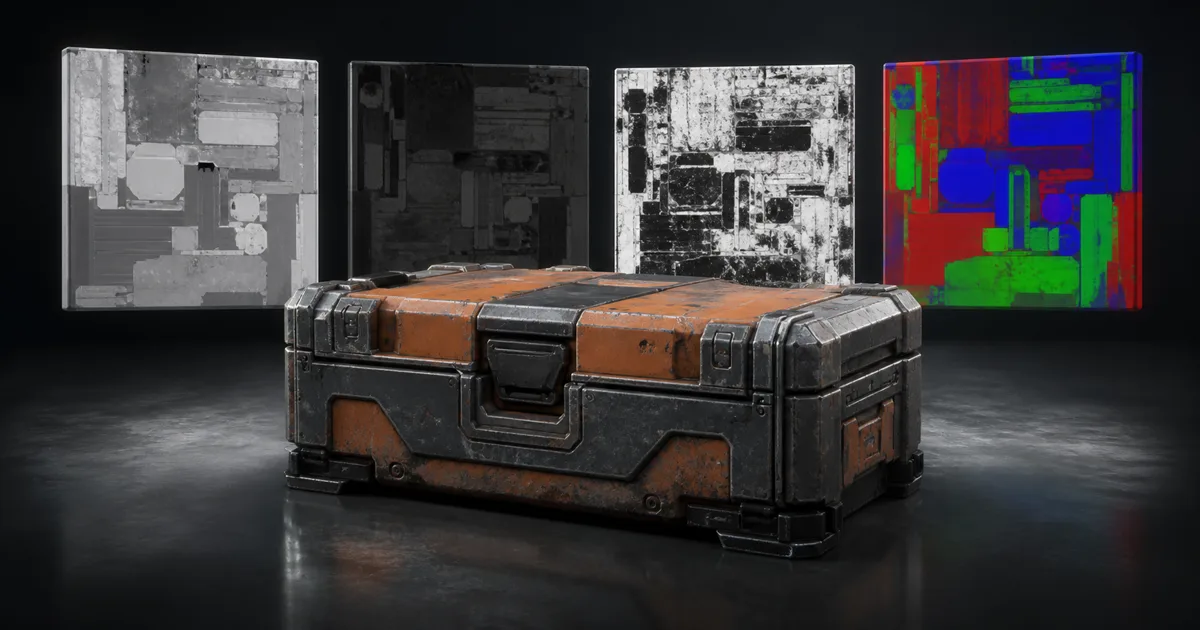
Texture channel packing stores several grayscale material maps inside the red, green, blue, and sometimes alpha channels of one texture. The technique is simple. The handoff is not. A packed file only works when the exporter, filename, import settings, shader, and documentation all agree on what each channel means.
That agreement is the real subject of this guide. Good PBR channel packing reduces texture samples and file clutter while preserving the same surface response. Bad packing produces a purple thumbnail, a mysteriously wet wall, and a short meeting in which everyone says “it worked on my machine” with unusual confidence.
Texture channel packing is a contract, not a color image
An RGB image contains three numeric values per texel. Color textures use those values together to describe a visible color. Channel packed textures use each value independently: red may hold ambient occlusion, green roughness, blue metalness, and alpha a fourth mask. The composite looks brightly colored because the channels differ, but that appearance has no artistic meaning.
The packed texture must share resolution, UV coordinates, tiling, and mip behavior across its contents. If roughness uses UV0 while AO uses UV1, they cannot occupy one ordinary packed texture without changing the shader logic. If one mask needs 2048 pixels and another only needs 256, packing both at 2048 may waste more memory than it saves.
Write the contract before exporting:
| Channel | Example content | Neutral or default value |
|---|---|---|
| Red | Ambient occlusion | 1, meaning unoccluded |
| Green | Roughness | Material-specific scalar or map |
| Blue | Metalness | Usually 0 for dielectric surfaces |
| Alpha | Optional height, smoothness, or mask | Pipeline-specific |
This example is ORM, not a universal law. ORM, RMA, and MRA name the channel order, but studios also use custom mask maps. A filename like crate_orm is useful. A filename like crate_masks_final_v7 is a small archaeological site.
Choose maps by shared sampling behavior
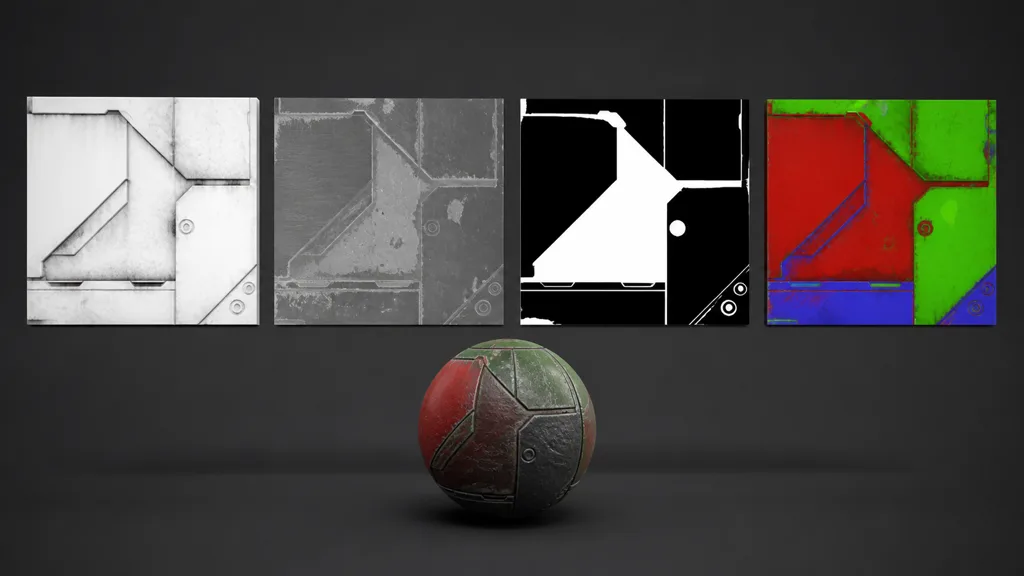
The best candidates for packed texture maps are scalar material data sampled with the same UVs: ambient occlusion, roughness or smoothness, metalness, cavity, height, detail masks, material IDs, wetness, or emissive masks. They are already grayscale, so each needs one channel.
Keep base color separate. It needs sRGB decoding and its channels form one color. Keep a tangent-space normal map separate too; its components jointly encode a direction and usually need a normal-aware compression format. Stuffing unrelated data into the unused-looking blue channel can disable those normal optimizations or create a decoding contract nobody remembers six months later.
Frequency matters as much as semantics. A crisp metalness boundary and a noisy roughness map can share a texture, but compression and mip generation now affect both. Put the most artifact-sensitive mask in the channel that receives the best precision under the chosen runtime format, then test the packaged result. Do not assume channel quality is identical across every GPU format.
A uniformly nonmetal material can use a scalar metalness value of zero instead of spending a channel. Empty channels are allowed. Filling all four because they exist is how technical art acquires decorative paperwork.
How to pack texture maps without losing the masters
- Keep unpacked source maps. Preserve full-quality grayscale masters with clear names. Packed files are delivery artifacts, not the only surviving source.
- Choose the target shader contract. Record channel order, roughness or smoothness, UV set, resolution, and default values.
- Match dimensions and alignment. Every source needs the same dimensions, crop, orientation, and UV coverage.
- Convert to linear data. Export scalar masks without an sRGB transfer curve and import the result as data.
- Invert only when required. If the target expects smoothness, derive it from roughness once and document the decision.
- Fill unused channels deliberately. Use safe defaults such as white AO or black metalness.
- Export the required bit depth and alpha. RGB and RGBA may choose different runtime compression families.
- Validate every channel and the material. Compare the imported result against the unpacked reference.
Automate export once the contract is stable: deterministic channel assignment, predictable filenames, import presets, and a small validation asset. If a node graph requires seven reroutes to reveal which channel is roughness, the graph is documenting a maze rather than a material.
Keep PBR channel packing linear and alpha deliberate
Roughness, metalness, AO, height, and masks are numeric data. They should normally be sampled linearly. Enabling sRGB decoding bends midrange values, so roughness authored near 0.5 no longer arrives as 0.5. The result can look glossier or duller even though the grayscale source seems unchanged in an image viewer.
Unity HDRP tells artists to disable sRGB (Color Texture) for mask maps in its mask map documentation. Epic’s Unreal texture mask guide likewise says packed masks should not be gamma corrected. Put the setting in an import preset; relying on every artist to remember one checkbox is an experiment with a known ending.
Before placing smoothness, height, or a detail mask in alpha, compare:
- one RGB packed texture plus a scalar constant;
- one RGBA packed texture;
- one RGB packed texture plus a small separate mask;
- a different allocation that avoids alpha entirely.
Measure disk size, resident GPU memory, sample count, and visible artifacts on the target platform. One fewer file is an organizational result, not automatically a rendering win.
Compression and mipmaps can couple unrelated masks
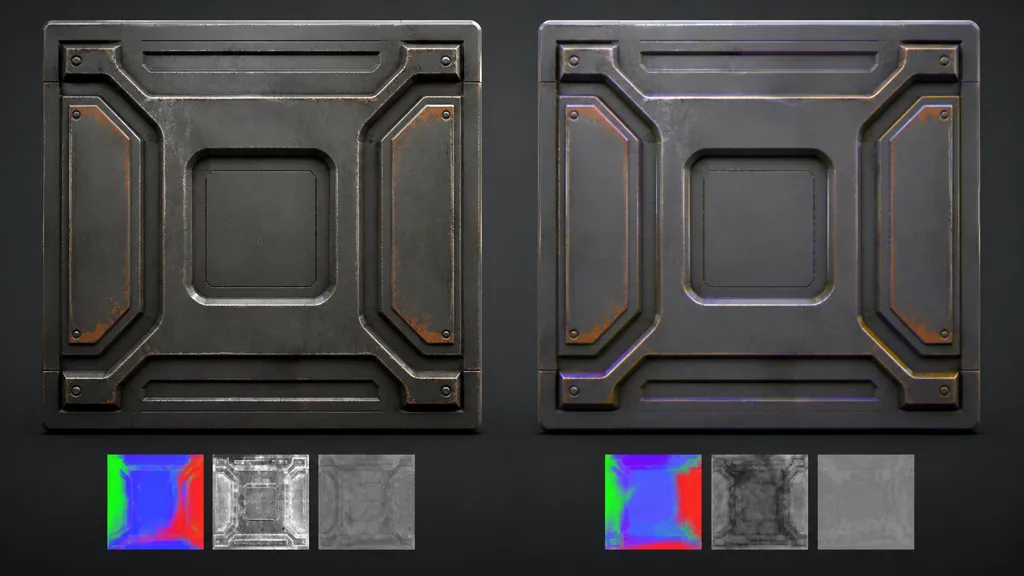
Texture packing for games trades several independent compression decisions for one shared decision. That is efficient when the masks have compatible needs. It is awkward when one channel contains a binary material ID and another contains subtle roughness noise.
Block compression can soften hard boundaries, introduce low-level values into black areas, or band gentle gradients. Mipmaps average neighboring texels, so thin metallic islands or narrow cavity marks can fade with distance. For atlased masks, gutters and dilation still matter because every channel shares the atlas boundaries.
Test the lowest useful mip, not only the source. A metalness mask should remain decisively metal or nonmetal except where the material physically blends. If compression produces gray halos along paint chips, the surface can acquire implausible mixed response. Roughness tolerates different errors: broad banding and smeared scratches may be more visible than tiny value drift.
The texture compression guide covers BC, ETC2, and ASTC choices in more detail. The practical rule here is narrower: pack maps that can survive the same resolution, compression, and mip policy. Separate the outlier.
ORM, RMA, and engine mask maps are not interchangeable
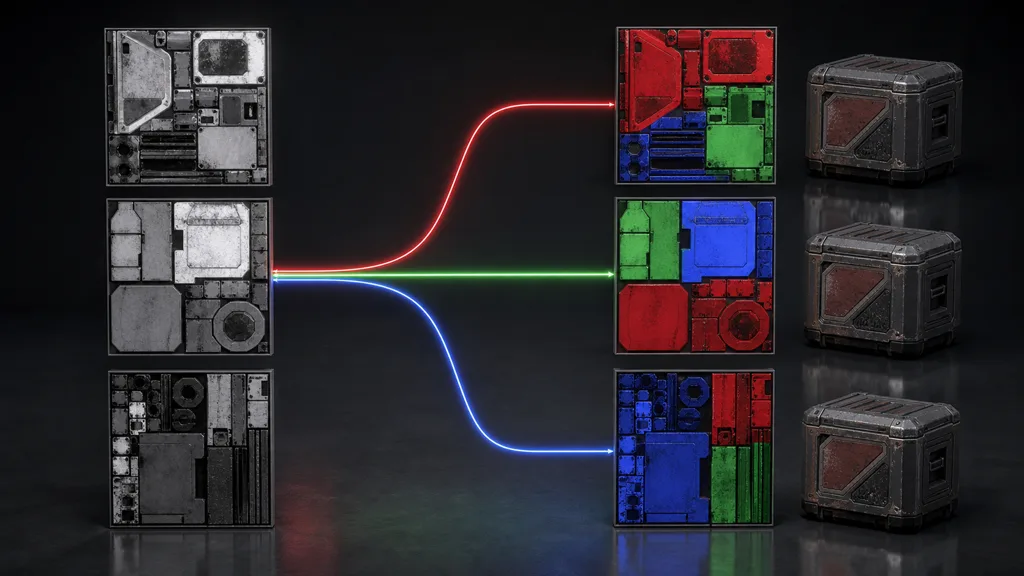
An ORM texture map conventionally stores occlusion in red, roughness in green, and metalness in blue. Godot’s ORMMaterial3D documentation uses that exact layout.
An RMA texture map places roughness, metalness, and AO in RGB order. An MRA texture map places metalness, roughness, and AO in RGB. Neither acronym makes the file self-configuring; the shader still needs to swizzle the correct channels.
For Unity mask map packing in HDRP, the Lit contract is red metallic, green AO, blue detail mask, and alpha smoothness. Roughness must be inverted for alpha. URP uses different slots and shader contracts, so do not feed an HDRP mask map into URP merely because both projects open in Unity.
For an Unreal ORM texture, a common export layout is red AO, green roughness, and blue metallic. Unreal’s graph can use any documented order by connecting channels to the correct inputs; Epic describes packing as a way to reduce samples, not as a mandatory universal RGB order. Disable sRGB and verify the sampler type.
For Godot packed textures, use ORMMaterial3D when the asset matches red AO, green roughness, and blue metallic. A custom ShaderMaterial can read another order, but conversion at export usually keeps the asset contract clearer.
Why packed textures look wrong
| Symptom | Likely cause | Fast test |
|---|---|---|
| Entire surface looks wet | Roughness read as smoothness, or sRGB is enabled | View sampled roughness as grayscale |
| Metal becomes plastic | Metalness uses the wrong channel or compressed gray | Display each RGB channel directly |
| Creases glow or darken badly | AO is inverted or misrouted | Temporarily set AO to 1 |
| Fine detail vanishes at distance | Mips or compression remove the mask | Inspect lower imported mips |
| Works in one engine only | Exporter and shader use different orders | Trace R, G, B, and A contracts |
| File size jumps after packing | Alpha selected a larger format | Compare runtime format and resident memory |
| Colors appear in the material | Packed RGB was treated as color | Split the sample into scalar channels |
When artists ask why do packed textures look wrong, isolate the contract before editing the art. Use a diagnostic material that displays red, green, blue, and alpha as four grayscale views. Then render the asset under a broad moving light. Channel previews prove routing; reflections prove the numbers still describe the intended surface.
Build one master set and export per destination
The best texture channel packing workflow 2026 keeps authoring independent from delivery. Maintain unpacked AO, roughness, metalness, height, and masks as named masters. Generate ORM, RMA, MRA, HDRP mask maps, or studio-specific outputs through presets. Store the contract beside the shader and include it in filenames or metadata.
Add three automated checks where practical:
- reject mismatched dimensions or missing source channels;
- confirm packed imports are linear and use the expected compression preset;
- capture a known validation asset and compare it with an approved reference.
Version the export preset with the shader. A texture channel packing preset and its consumer should change together. If the shader changes its channel order, old assets should fail loudly rather than becoming subtly shinier. A magenta missing texture is ugly but honest. A plausible material with swapped AO and metalness can survive review long enough to become expensive.
Use the PBR workflow guide for map meaning, the texture atlas guide for grouped assets, and the texture filtering guide for mip and grazing-angle behavior.
FAQ
What is texture channel packing?
Texture channel packing stores separate grayscale maps in the red, green, blue, and optionally alpha channels of one image. A shader reads each channel independently, reducing texture samples when the maps share resolution and UVs.
What does ORM mean in textures?
ORM means occlusion, roughness, metallic. The usual order is red for ambient occlusion, green for roughness, and blue for metallic, but the exporter and shader contract should still be verified.
Should packed texture maps use sRGB?
Usually no. AO, roughness, metalness, height, and masks are numeric data and should be imported as linear textures. Enabling sRGB changes their midrange values and therefore changes the rendered material.
Is channel packing always better for performance?
No. It can reduce texture samples and file count, but alpha, resolution mismatches, or a less suitable compression format can increase memory or damage quality. Profile the runtime format and target hardware.
Can I pack a normal map with roughness and metalness?
It is possible with a custom encoding, but it often sacrifices normal-map compression and creates a more fragile shader contract. Keep normal maps separate unless the renderer has a deliberate, tested format for combining them.
What is the difference between ORM and RMA textures?
The difference is channel order. ORM uses occlusion, roughness, metallic in RGB; RMA uses roughness, metallic, ambient occlusion. The shader connections must match the chosen order.
Why does my packed texture look purple?
The composite preview is showing unrelated grayscale masks as RGB, so bright colors are normal. It is a data container, not a color map; inspect each channel separately and never connect the whole RGB value to Base Color.
Try CraftPBR
CraftPBR keeps texture channel packing at the delivery edge while preserving editable material sources:
- Text-to-PBR creates aligned material maps from a physical surface description.
- Photo-to-PBR converts a controlled image into coordinated base color, normal, roughness, height, AO, and metalness.
- Node workspace keeps source masks, levels, inversions, and packing logic visible and editable.
- Engine export prepares ORM, smoothness, normal orientation, channel assignments, and file names for common destinations.
- Free tier lets you build and validate a complete material before shipping packed outputs.
- CC0 output lets you modify, pack, render, and ship generated materials without attribution.
Create an engine-ready PBR material →
Keep the maps understandable before making the files economical.