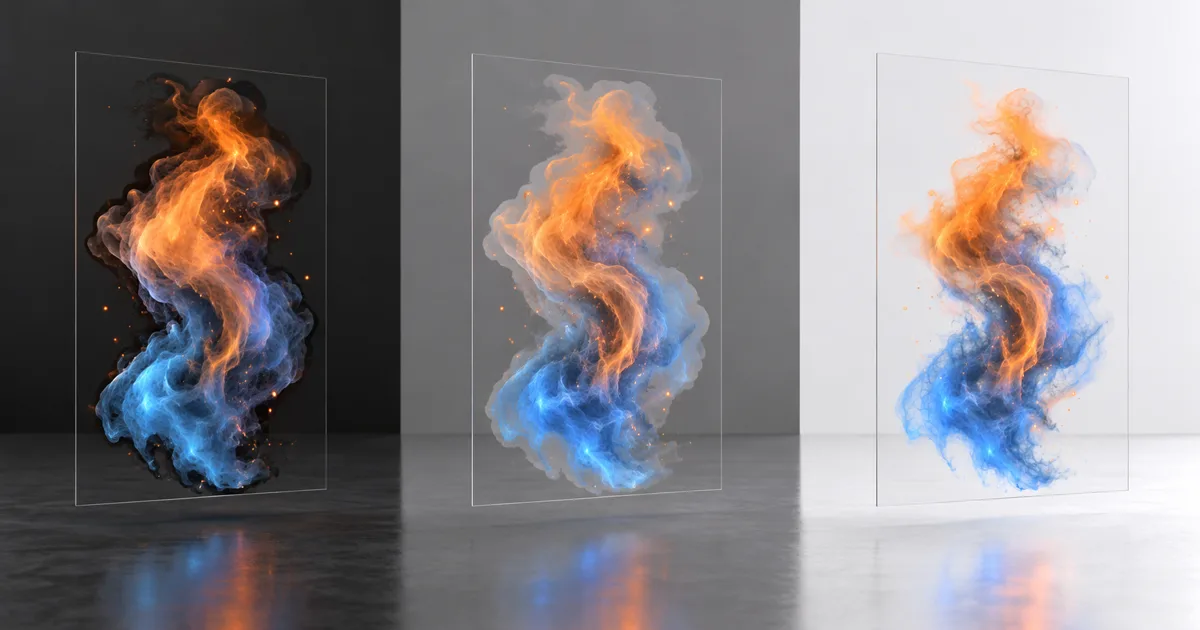
A smoke sprite behaves on black, grows a charcoal outline on white, and turns muddy over a gray wall. The texture is not missing pixels. Its pixels and blend state disagree about who already multiplied the color. Premultiplied alpha makes that agreement explicit.
In a premultiplied texture, RGB stores the color contribution after multiplication by alpha. This representation makes source-over compositing compact and gives filters meaningful edge values, but only when import, mip generation, shader output, render targets, and blend factors follow the same convention. One silent conversion is useful. Two are a vignette.
Premultiplied alpha stores contribution, not secret color
Consider a red pixel with 50% opacity. In straight alpha it is stored as (1, 0, 0, 0.5). In premultiplied form it is (0.5, 0, 0, 0.5). Alpha remains coverage; RGB becomes the amount of source light contributed before the background is allowed through.
For ordinary source-over premultiplied alpha blending, color is:
out.rgb = src.rgb + dst.rgb × (1 - src.a)
With straight alpha, the equivalent expression is src.rgb × src.a + dst.rgb × (1 - src.a). The W3C compositing specification defines the same source-over relationship, while Microsoft's premultiplied alpha reference shows how the stored values and equations differ.
At alpha zero, valid premultiplied RGB is normally zero. That removes the infinite collection of invisible colors possible with straight alpha. A transparent pixel has no visual contribution, so premultiplied storage declines to preserve its private collection of magenta.
Straight alpha vs premultiplied alpha is a contract

Straight alpha vs premultiplied alpha is not a quality switch. Both represent the same visible layer and both composite correctly when paired with the right math. Straight alpha is convenient for painting and some file formats because color can remain independently editable. Premultiplied alpha is convenient for rendering, filtering, blur, and repeated compositing because RGB already represents contribution.
Trouble starts at a boundary with no declared convention. A PNG may store straight alpha, a loader may premultiply it, a shader may multiply again, and the blend state may expect premultiplied output. The soft edge is then attenuated twice. The inverse mismatch sends straight RGB through a One source factor and makes faint pixels too bright.
Use explicit names in tools and code: smoke_straight.png, ui_premult_rt, or a metadata field beside the asset. “RGBA” states channel count, not alpha ownership.
Premultiplied alpha fixes filtering only when order is correct
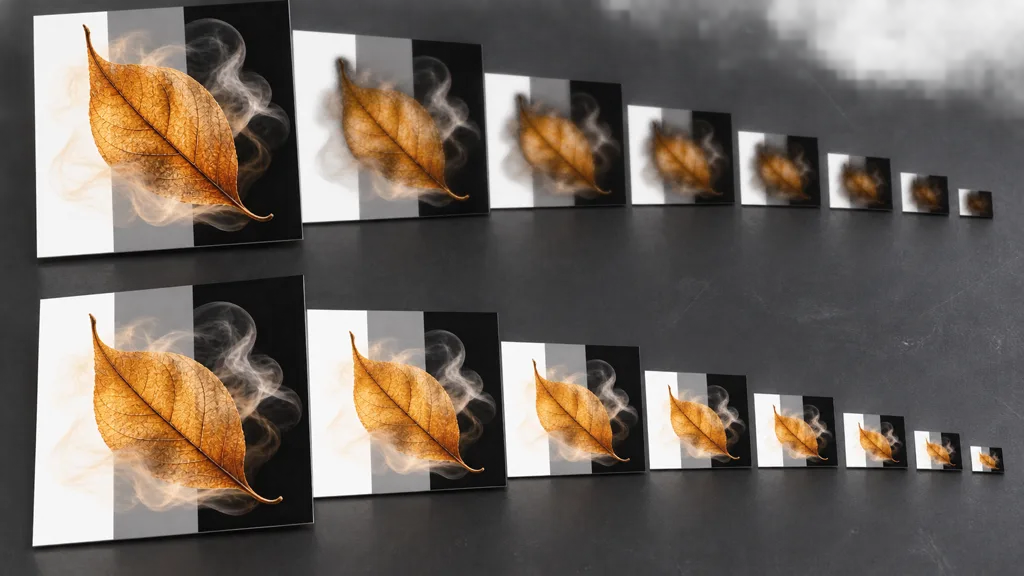
Bilinear filtering, resizing, blur, and mip generation average neighboring texels. Suppose an opaque orange texel sits beside a transparent black texel in straight storage. Their midpoint becomes dim orange with half alpha. If later multiplied by alpha again, its color contribution becomes too dark. This is the familiar premultiplied alpha dark edges failure, even though the original shape looked correct at mip zero.
Correct premultiplied alpha mipmaps start by decoding RGB to linear light, multiplying RGB by alpha, filtering color contribution and alpha with the same footprint, and keeping the result premultiplied for rendering. If an editor needs straight color afterward, unpremultiply once with a guarded divide where alpha is safely above zero. Near zero, division magnifies quantization and compression noise.
Edge dilation still matters for straight-alpha art pipelines, especially when a tool or engine filters before conversion. Fill transparent neighbors with plausible edge color, not black or white. Dilation is insurance for a known straight stage; it is not permission to leave the runtime convention unknown. The UV padding guide covers the related problem around packed islands.
Match premultiplied alpha textures to blend factors
The GPU blend unit cannot inspect intent. It receives source color, source alpha, destination color, and factors. For the common source-over case:
| Stored shader output | Source factor | Destination factor | Typical symptom if mismatched |
|---|---|---|---|
| Straight RGB | SrcAlpha | OneMinusSrcAlpha | Correct ordinary transparency |
| Premultiplied RGB | One | OneMinusSrcAlpha | Correct premultiplied source-over |
Premultiplied RGB with SrcAlpha | Wrong | OneMinusSrcAlpha | Dark, weak, over-attenuated edges |
Straight RGB with One | Wrong | OneMinusSrcAlpha | Bright or additive-looking fringes |
This premultiplied alpha formula also supports useful VFX: RGB can be greater than alpha, deliberately adding light while alpha controls how much background is obscured. Microsoft's Direct2D alpha-mode reference notes that such values produce additive contribution under standard source-over math. Use that deliberately for fire and energy, not as an accidental residue from unpremultiplication.
Separate color and alpha blend equations when preserving destination alpha matters. UI layers, offscreen buffers, and later compositing may need out.a = src.a + dst.a × (1 - src.a). A frame can look correct against today's background while storing broken alpha for tomorrow's pass.
Premultiplied alpha belongs in linear color space
Premultiplied alpha linear color space processing is essential because multiplication and averaging model light contribution. Performing them directly on sRGB-encoded values biases midtones and makes edge brightness depend on transfer encoding. Decode color, premultiply in linear space, filter or composite, then encode only at the output boundary that requires it.
Alpha itself is normally linear data. Do not apply an sRGB curve to opacity, masks, roughness, or other scalar channels packed beside color. The sRGB versus linear textures guide explains the wider import contract.
Compression adds another edge case. Low-alpha premultiplied RGB occupies a small numeric range, so an unsuitable block format can quantize subtle smoke color aggressively. Test the shipped format and smallest visible mip. A lossless source file does not negotiate with the runtime compressor on your behalf.
Set premultiplied alpha in Unity and Unreal Engine
For premultiplied alpha Unity shaders, emit RGB already multiplied by alpha and use Blend One OneMinusSrcAlpha. Unity's current shader blending manual lists that pair for premultiplied transparency and Blend SrcAlpha OneMinusSrcAlpha for traditional transparency. Confirm what Shader Graph or the selected render pipeline emits before adding another multiply.
For premultiplied alpha Unreal Engine, the AlphaComposite blend mode expects premultiplied source color. Epic's Material Blend Modes documentation gives Source Color + Dest Color × (1 - Source Opacity) and notes its usefulness for effects that mix additive and translucent regions. Test particles on bright scenery because additive-only effects often disappear there.
Blender, compositors, browser canvases, native UI frameworks, and video tools may use different file and in-memory conventions. Treat every import, render target, effect node, readback, and export as a typed boundary. Visual familiarity with one application is not metadata.
How to fix alpha blending halos in eight checks
- Capture the failure. Test the asset over black, 18% gray, white, saturated color, and a bright HDR background.
- Read the pixels. Inspect RGB and alpha at the opaque center, soft edge, and alpha-zero exterior.
- Declare every stage. Mark source file, loader, intermediate buffer, runtime texture, shader output, and render target as straight or premultiplied.
- Match factors. Use
SrcAlphafor straight RGB orOnefor premultiplied RGB, both withOneMinusSrcAlphafor destination color. - Repair filter order. Decode to linear, premultiply, resize or build mips, and avoid needless round trips.
- Remove duplicate work. Disable a shader multiply if import already premultiplied, or disable import conversion if shader owns it.
- Inspect final formats. Check compression, channel swizzles, post effects, render-target alpha, platform overrides, and readback.
- Validate motion. Play particle fades, camera zoom, animation, overlap, exposure changes, and the cooked build.
If changing only the background changes the apparent edge color, the asset has handed you a compositing clue. Keep it.
This is the best premultiplied alpha workflow 2026 because it identifies the first convention mismatch instead of painting over the last visible halo.
Validate premultiplied alpha where it can fail loudly

Build a lane with soft smoke, saturated fire, a low-alpha decal, a neutral glass shard, a UI icon, and an alpha-tested leaf. Repeat it against dark, gray, white, saturated, and HDR backgrounds. Add near and far copies so premultiplied alpha artifacts in filtering and mips cannot hide at full resolution.
Test isolated layers, then overlap them in different draw orders. Premultiplied alpha does not solve transparency sorting, depth-writing policy, overdraw, or physically accurate transmission. It solves how color contribution and coverage are represented and combined. The opacity map guide helps choose masked versus blended surfaces before this math matters.
Pass when edge hue stays stable across backgrounds, fade energy changes smoothly, mips do not acquire dark or pale outlines, repeated layers follow the intended source-over result, and captured render-target alpha remains usable downstream. Save the test scene; transparent bugs enjoy returning under a new filename.
FAQ
What is premultiplied alpha?
Premultiplied alpha stores each RGB channel already multiplied by the pixel alpha. A half-transparent red pixel that is straight RGBA (1, 0, 0, 0.5) becomes premultiplied RGBA (0.5, 0, 0, 0.5), so stored color represents its direct contribution to the composite.
Is PNG straight or premultiplied alpha?
PNG stores unassociated, or straight, alpha. A loader, UI framework, renderer, or import pipeline may convert those pixels to premultiplied form in memory, so the file convention does not prove the runtime convention.
What is the difference between straight alpha and premultiplied alpha?
Straight alpha stores full RGB separately from coverage and multiplies RGB during blending. Premultiplied alpha stores RGB after that multiplication and uses a source blend factor of One; both produce the same source-over result when the pixels and blend state agree.
Why do transparent textures have black edges?
Filtering often mixes an opaque colored pixel with transparent pixels whose hidden RGB is black. If that interpolated result is then handled with the wrong alpha convention, the dark contribution survives as a fringe; bad edge dilation and gamma-space processing can make it worse.
What blend mode should premultiplied alpha use?
For ordinary source-over color blending, use source One and destination OneMinusSrcAlpha. Straight-alpha content normally uses SrcAlpha and OneMinusSrcAlpha instead; applying SrcAlpha to premultiplied RGB multiplies the source twice and darkens soft edges.
Should you premultiply alpha before or after resizing?
Premultiply before filtering, resizing, blurring, or building mipmaps, and keep the operation in linear light. This lets every filter average actual color contribution and coverage instead of averaging arbitrary RGB hidden behind transparent pixels.
Does premultiplied alpha fix transparency sorting?
No. Premultiplied alpha improves the representation and filtering of translucent color, but overlapping transparent surfaces can still require sorting, order-independent transparency, or an effect-specific approximation.
Try CraftPBR
CraftPBR gives a premultiplied alpha test coordinated material data before the engine-specific compositing step:
- Text-to-PBR generates aligned base color, normal, roughness, height, AO, and metalness from a material brief.
- Photo-to-PBR converts a controlled source photo into a coherent PBR set.
- Node workspace keeps levels, masks, tiling, and map relationships editable.
- Engine export prepares normal orientation, channel packing, color-space intent, and clear filenames.
- Free tier lets you build a representative material and validate the full runtime path.
- CC0 output lets you inspect, premultiply, filter, repack, and ship generated textures without attribution.
Choose one alpha convention per boundary. Make every conversion visible. Let transparent pixels retire without taking a fringe with them.