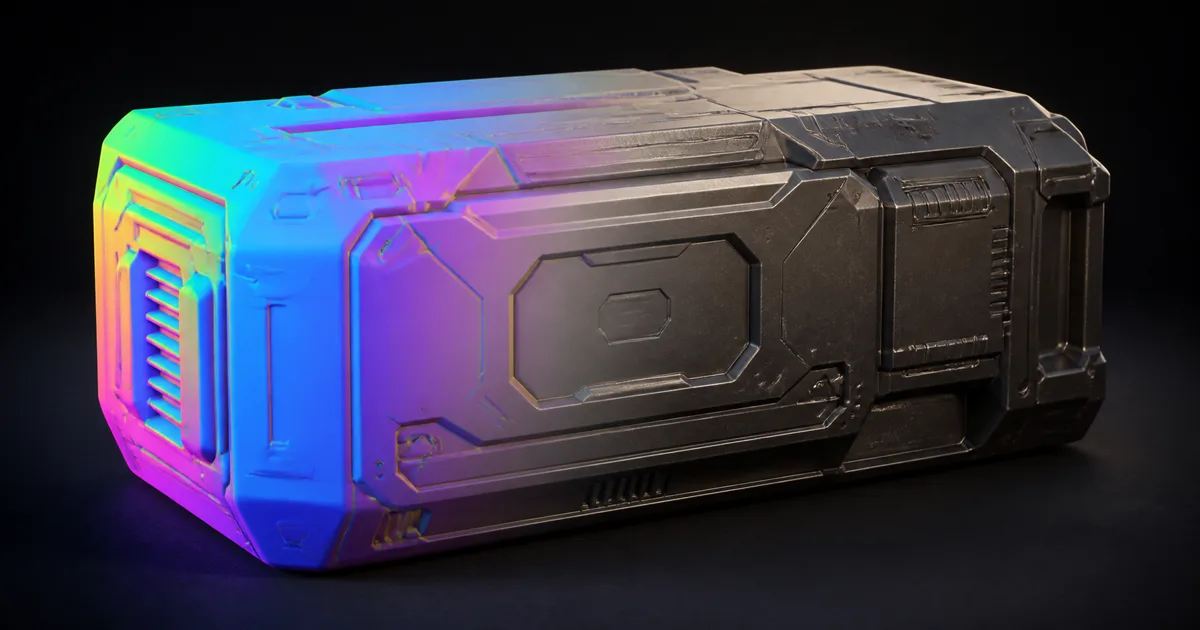
An object space normal map stores the finished direction of a surface normal in the local coordinate frame of one mesh. Open the texture and it looks like a tropical weather system: cyan on one side, magenta on another, green across the top. That rainbow is not decoration or corruption. It is the object telling the shader which way every texel points.
The format can be precise, cheap to evaluate, and independent of tangent-basis disagreements. It can also fail spectacularly when copied to a different mesh, fed through a tangent-space normal slot, mirrored, or used on a deforming character. The map is loyal to one coordinate frame. Production trouble starts when the pipeline forgets which one.
This guide explains how do object space normal maps work, where they fit beside tangent maps, how to bake them, how to transform them at runtime, and how to validate the full chain rather than trusting a colorful thumbnail.
An object space normal map is a direction field
Every RGB texel represents a signed three-dimensional vector. The usual decode maps stored color from [0, 1] into direction components from [-1, 1]:
normalOS = normalize(texture.rgb * 2.0 - 1.0)
Red carries the local X component, green carries local Y, and blue carries local Z, subject to the baker and renderer's axis convention. A face pointing mostly along positive X becomes red-heavy. A top face pointing along positive Y or Z becomes green- or blue-heavy depending on the chosen up axis. Curves blend those components, so object space normal map colors spread across the full spectrum.
That differs from a tangent-space map. Tangent space defines a small coordinate frame at each surface point. A nearly flat tangent normal therefore points close to local tangent Z and appears mostly blue-purple across the whole texture. An object-space texel instead stores the final direction relative to the object's origin and axes. Flat faces pointing in different directions should have different colors.
The texture still changes shading only. It does not move the silhouette, create parallax, or repair a poor low-poly profile. It replaces or perturbs the normal used by the lighting model. Geometry remains stubbornly geometric.
Object space vs tangent space starts with motion
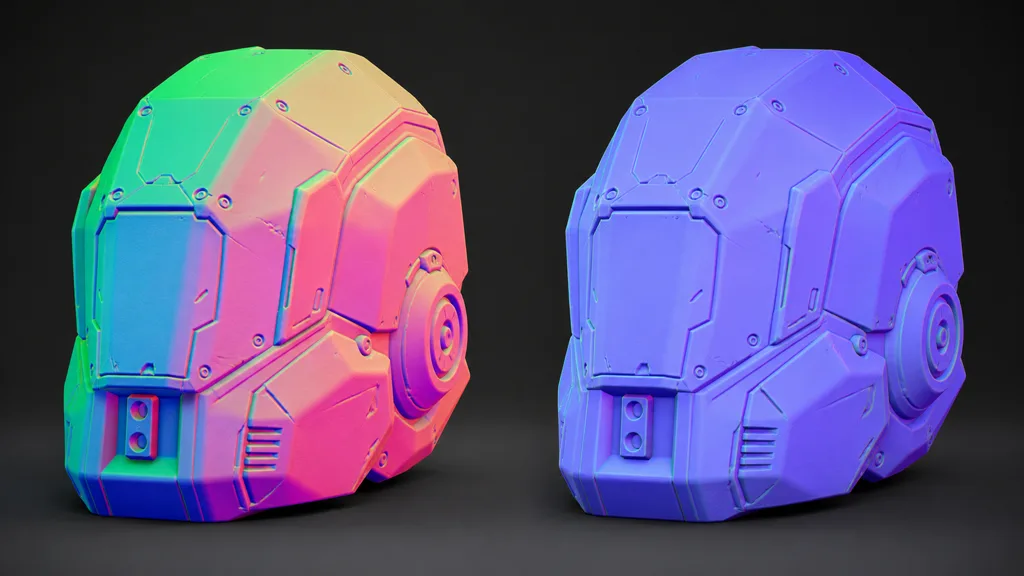
The useful object space vs tangent space normal map decision is not “which looks better?” Both can reproduce the same baked high-poly detail when their contracts match. The decision is about what may change after baking.
Use object space for a rigid mesh whose vertex positions, topology, UV placement, and local orientation stay fixed. Static environment props, vehicle parts, modular machinery, impostors, and some scan-derived assets can qualify. The shader decodes one complete direction, transforms it from object to world space, and skips tangent-basis reconstruction. This can also avoid seams caused by a baker and engine using different tangent generation.
Use tangent space when the mesh will deform, when the same detail texture must tile across many objects, when UV shells may rotate or mirror, or when normal layers must combine. Tangent directions follow the deformed surface, so a character elbow can bend without its pores continuing to point toward the bind pose.
Do not confuse object space with world space. Object-space data rotates and translates with the object after the shader applies the object-to-world normal transform. World-space data stays tied to global axes and is normally limited to fixed scene geometry or diagnostic buffers. Blender's Normal Map documentation makes the distinction cleanly: object-space normals follow object transforms but depend on deformation, while tangent-space normals support both transforms and deformation.
Bake one mesh, one frame, one promise
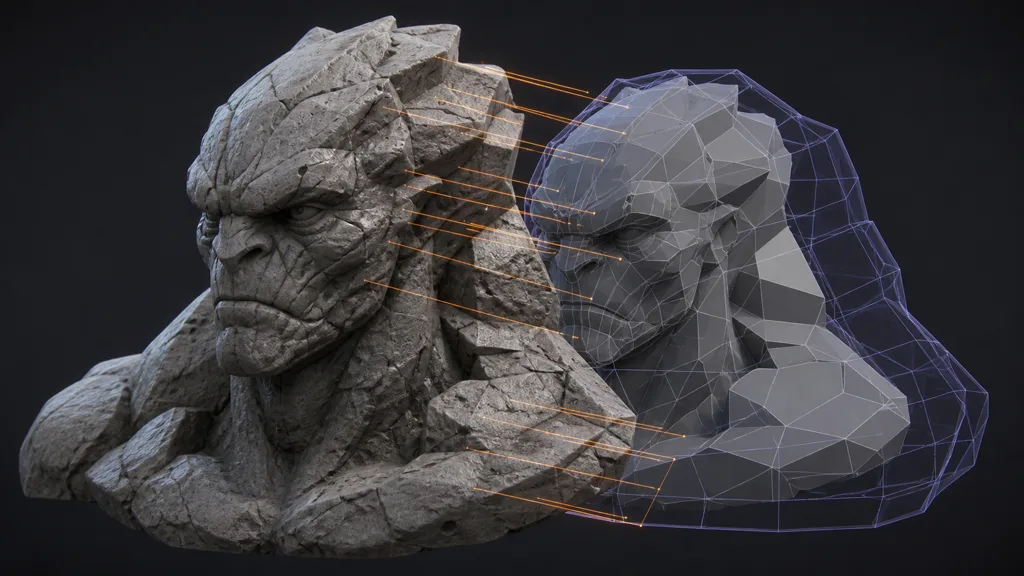
Good object space normal map baking begins by freezing the contract before rays are cast:
- Finalize the low-poly mesh. Lock topology, smoothing, local axes, unapplied negative scale, and triangulation. A later change can alter interpolation even if the UVs look untouched.
- Match high and low geometry. Put both in the same object frame. Apply intentional transforms consistently; do not repair an axis mismatch by rotating only one mesh.
- Create stable UVs. Object-space maps still need UV coordinates. Give islands enough padding for the lowest shipping mip and avoid mirrored shells unless the content and renderer explicitly support that symmetry.
- Build a cage. Enclose the high-poly detail without allowing rays to hit neighboring parts. Inspect concave areas, thin gaps, and stacked pieces rather than trusting one global distance.
- Choose Object as bake space. Record RGB swizzles, handedness, and object up axis in the export preset. “Normal map” alone is not a complete file description.
- Bake at working resolution. Inspect the decoded result on the low-poly mesh under fixed light. Skewed rays, hard seams, and missed surfaces are easier to identify before compression.
- Dilate every UV island. Fill padding with valid neighboring directions so bilinear filtering and lower mips do not blend toward black or unrelated texels.
- Export linear RGB data. Disable color grading and display gamma. Preserve all three signed direction components.
If you are learning how to bake an object space normal map in Blender, Cycles exposes Object under Render > Bake > Normal > Space. Its documentation also notes that bake and material spaces must match. Selected-to-active projection, cage rules, ray distance, and margin remain the same practical controls used for tangent bakes.
Save the high mesh, low mesh, cage, bake settings, swizzles, and test material together. The colorful PNG is an output, not enough evidence to recreate the output.
Decode first, transform once, normalize last
The shader must sample the texture as linear data, decode RGB to a signed object-space vector, transform that vector with the correct normal matrix, then normalize it before lighting. Conceptually:
normalWS = normalize(ObjectToWorldNormal(normalize(tex.rgb * 2.0 - 1.0)))
Normals are not positions. Translation must not affect them. With non-uniform object scale, multiplying by an ordinary direction matrix can make the normal no longer perpendicular to the surface; a proper inverse-transpose normal transform is required. Engine helper functions usually handle this distinction, but a custom graph assembled from generic vector transforms may not.
Common object space normal map artifacts reveal which step was skipped:
- the map lights correctly only at the original rotation: data was treated as world space;
- every face looks strongly dented or sideways: encoded RGB entered a normal input without signed decoding;
- the result changes when the object is scaled: normal transform or normalization is wrong;
- lighting is correct on one axis and inverted on another: RGB swizzle, handedness, or negative scale differs between baker and engine;
- UV islands show dark borders at distance: padding or mip generation blended invalid directions;
- a rigid prop works but a skinned copy folds into strange gradients: object-space data stayed in the bind frame.
Do not add a tangent detail normal directly to an object-space vector. Convert both into one coordinate space, use a valid normal-composition method where appropriate, and normalize the result. Often the simpler production answer is to choose tangent space for the whole layered material; the normal map blending guide covers those composition rules.
Compression and mips can rotate the evidence
Tangent maps often store X and Y in two channels and reconstruct a positive Z component. A general object-space direction can point anywhere around the unit sphere, including negative Z. That means object space normal map compression usually needs three trustworthy signed components; blindly using the same two-channel reconstruction can fold half the sphere into the other half.
Prefer a high-quality three-channel format such as BC7 on supported desktop targets, or an appropriate ASTC profile on mobile. Test the actual platform encoder. A generic color preset may spend bits on perceptual brightness while rotating the vector that lighting needs. Lossy compression is allowed; unmeasured direction error is not.
Generate mips as vector data. Average neighboring decoded normals, renormalize, then encode again when the pipeline supports custom processing. Ordinary RGB downsampling can shorten the vector and drift its direction, especially where high-poly detail changes rapidly. Renormalizing only the sampled final value repairs length, not every direction error introduced while building the mip chain.
Keep the texture linear, disable alpha tricks unless documented, and avoid hue or contrast edits in a paint package. Those controls are excellent at making the thumbnail prettier and equally excellent at changing surface orientation. See the texture compression guide for platform format budgets and the UV padding guide for mip-safe island margins.
Object space normal maps in Unity, Unreal, and Blender
For object space normal map Unity work, standard normal slots and the Normal texture import path are designed around common tangent-space use. A custom Shader Graph or HLSL shader should sample RGB as linear data, remap it to signed values, transform the object-space normal with a proper object-to-world normal operation, normalize it, and feed a world-space normal input. Unity's current URP shader examples use TransformObjectToWorldNormal for object normals; reuse the pipeline helper instead of rebuilding inverse-transpose math from guesswork.
For object space normal map Unreal Engine materials, decode the texture as vector data, transform Local Space to World Space, normalize, and supply the world-space result with Tangent Space Normal disabled on the material. Epic's tangent-free bump mapping documentation notes that world-space normal outputs require the tangent-space setting to be false. Treat compression and sampler type deliberately; an asset labeled “normal map” may otherwise receive assumptions intended for tangent data.
For object space normal map Blender setup, the Normal Map node directly supports Object space. Set the Image Texture to Non-Color, select the matching Object convention, and connect the Normal output to the BSDF. Blender also exposes OpenGL and DirectX conventions plus bake-compatible Blender Object modes, so the consuming node must match the bake rather than whichever menu name looks closest.
Across all three, test one uncompressed reference texture before platform compression. If the reference fails, the contract is wrong. If only the compressed build fails, the contract is fine and the storage policy is guilty.
Validate transforms before judging detail
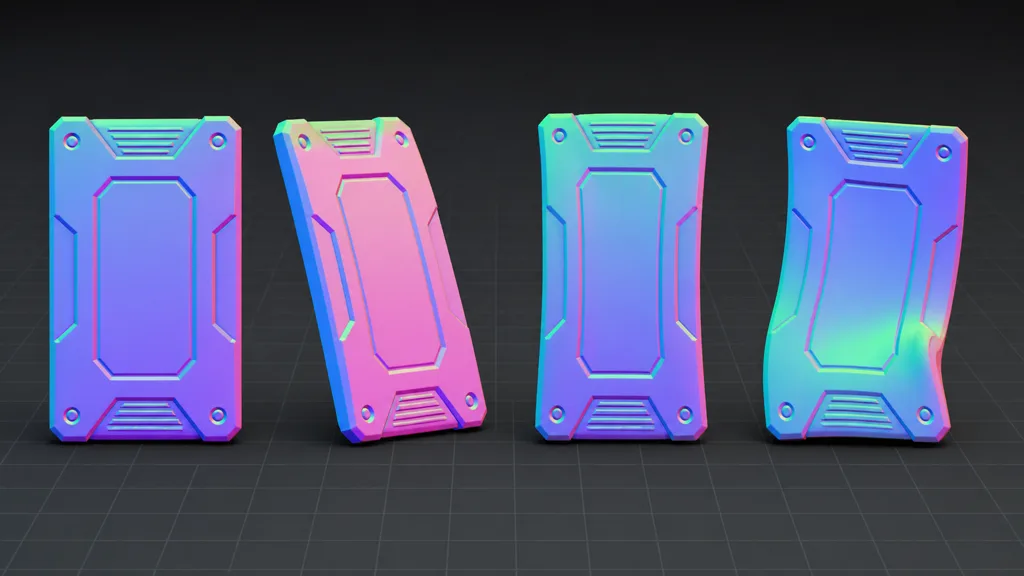
The best object space normal map workflow 2026 uses a transform matrix of tests, not one beauty render:
- render the prop at identity, then rotate it 90 degrees on each object axis;
- move and rotate the camera while object and light stay fixed;
- test uniform and non-uniform object scale;
- compare compressed and uncompressed texture builds at every mip;
- inspect UV borders under grazing light and at distance;
- apply a deliberate bend or skin deformation and confirm the expected failure boundary;
- render the decoded object-space vector as color before lighting;
- compare against the low-poly vertex normal and a tangent-space reference bake.
Rotation should move the shading with the rigid object. Camera motion should not alter the stored local direction. Non-uniform scale should remain correct when the normal matrix is correct. Deformation is the decisive test: if the production asset bends, morphs, or changes topology, the object-space promise has expired.
That answers when to use object space normal maps: when fixed local geometry is a real production constraint, not a hopeful note in an asset name. Under that constraint, object space is elegant. Outside it, tangent space earns its popularity.
Try CraftPBR
CraftPBR gives an object space normal map a coherent material set around it:
- Text-to-PBR generates aligned base color, normal, roughness, height, AO, and metalness from a written material brief.
- Photo-to-PBR converts controlled surface evidence into editable maps without welding captured room light into the result.
- Node workspace lets you tune tiling, levels, roughness, height, masks, and normal strength before export.
- Engine export prepares channel packing, color-space intent, normal orientation, and target-friendly names.
- Free tier lets you generate and test a complete material before committing budget.
- CC0 output lets you edit, bake, combine, render, and ship the generated textures without attribution.
Object space is not mysterious. It is merely very literal, which is often more dangerous.
Build a production-ready PBR material →