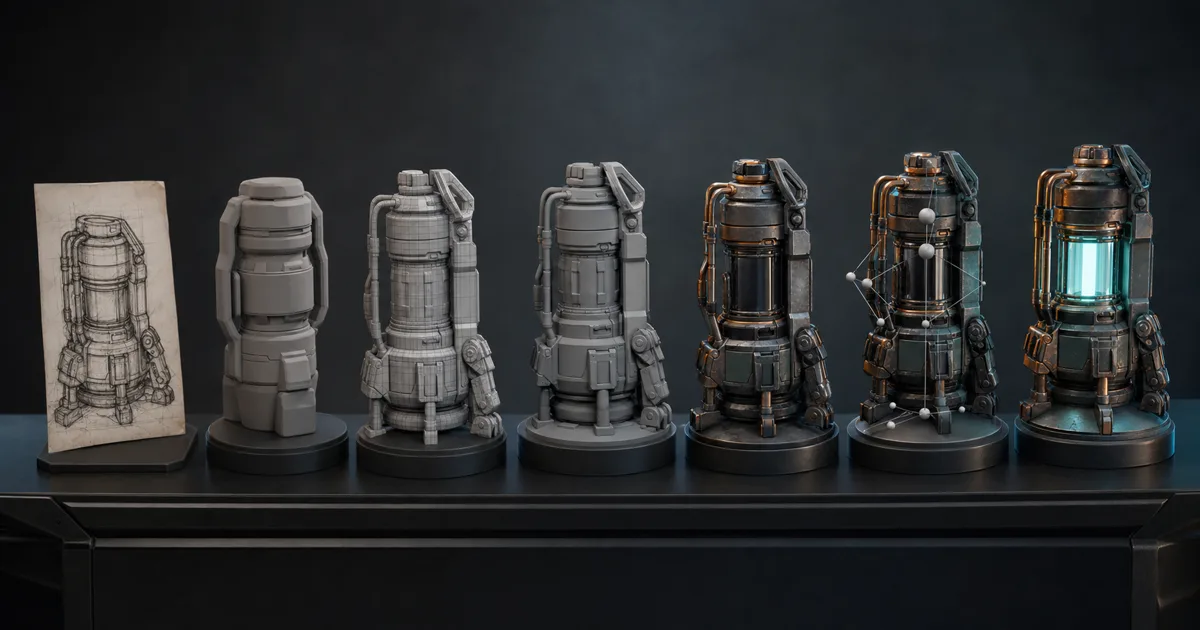
AI 3D art tools are most useful when they shorten one expensive decision without quietly breaking the next five. A concept generator can settle silhouette. A mesh generator can provide a blockout. A material tool can turn a surface brief into coordinated maps. None of those outputs automatically knows your topology budget, UV rules, shader convention, collision needs, or whether the art director asked for a door that can actually open.
This guide treats AI 3D art tools as stations in an asset pipeline, not contestants in a universal ranking. The practical question is where each tool enters, what artifact it must return, and which human approval gate protects the rest of production.
Choose AI 3D art tools by deliverable
Start with the artifact you need, not the most impressive generation mode. “Make a prop” hides several contracts: reference, geometry, topology, UVs, materials, rig, animation, collision, levels of detail, and engine metadata. A tool can be excellent at one contract and expensive everywhere else.
| Production stage | Useful AI output | Required human gate |
|---|---|---|
| Concept and reference | Silhouette sheets, material directions, variations | Design intent, consistency, provenance |
| Blockout and mesh | Volume study, static prop candidate, scan cleanup | Dimensions, silhouette, topology, separate parts |
| Materials | Tileable source, texture projection, PBR map candidates | Map meaning, UV fit, scale, seams, rights |
| Rig and motion | Joint proposal, retarget, performance solve | Deformation, contacts, timing, gameplay readability |
| Engine delivery | Naming suggestions, format conversion, repetitive setup | Imports, collision, LODs, memory, lighting, platform budget |
This framing makes comparisons more useful. Meshy’s current documentation, for example, describes image-to-3D and text-to-3D followed by texturing, remeshing, rigging, and export. That is a chain of stages, not proof that every intermediate result is ready to ship. Adobe Substance 3D Sampler’s image-to-material workflow turns an image into material channels, while Epic’s MetaHuman Animator solves animation from video, depth, or audio. They address different uncertainty.
The best AI 3D art tools 2026 has to offer are therefore the ones that fit a named deliverable and export something your next application can inspect. A beautiful proprietary preview with no editable handoff is a destination, not a pipeline component.
Use AI tools for 3D artists during preproduction
Preproduction is a forgiving place for AI 3D art tools and generative AI for 3D artists because the output is evidence for a decision, not yet the asset itself. Generate silhouette families, material combinations, wear states, prop variations, or a rough environment kit. Then translate the chosen direction into a compact brief.
A useful brief records:
- real-world dimensions and camera distance;
- silhouette features that must survive every revision;
- parts that move, detach, open, deform, or receive damage;
- material substances and layer order;
- style rules, exclusions, and reference provenance;
- target engine, platform, texture budget, and polygon budget.
For AI tools for game artists, a turnaround image should show enough angles to remove ambiguity. Avoid dramatic perspective, cropped extremities, hard baked shadows, and a different design on every side. The generator may suggest; the brief must decide.
Use variation deliberately. Ask three questions of each candidate: Does it solve the gameplay or scene need? Can it be built with the project’s budget? Does it belong beside existing assets? Saving forty variations without recording why one won merely converts visual uncertainty into folder uncertainty.
Treat AI tools for 3D modeling as blockout machines first
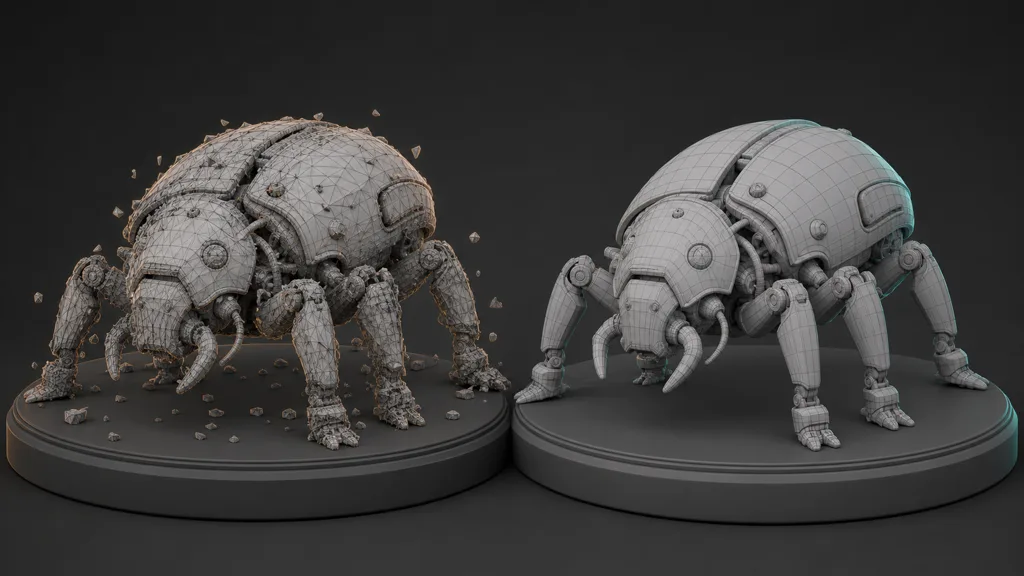
At the geometry stage, AI 3D art tools and dedicated AI tools for 3D modeling can create useful mesh candidates from text or images. A generated volume may be enough for background dressing, a static proxy, an early composition pass, or the high-frequency source for a manual rebuild. Calling it “finished” should depend on the asset’s job, not the download button.
Inspect geometry before texturing it:
- Silhouette: view the asset unlit, from gameplay distance and all important angles.
- Construction: separate panels, hinges, handles, wheels, and moving parts into geometry that can behave correctly.
- Topology: find non-manifold regions, internal faces, holes, needle triangles, pinching, and density that ignores deformation or shading.
- Scale and origin: set real dimensions, transforms, pivot, forward axis, and ground contact.
- UVs: check distortion, padding, texel density, symmetry, and space reserved for unique details.
- Normals: inspect hard edges, smoothing, tangents, and baked shading on the low-poly mesh.
Meshy’s text-to-3D API documentation exposes topology, target polygon count, remeshing, pose, and output-format controls. Those are useful knobs, but a polygon target is not topology intent. Blender’s retopology documentation explicitly notes that automatic remesh results generally do not provide deformation-friendly topology. A hero character elbow remains unimpressed by the phrase “quad-dominant.”
Keep the generated source as reference. Rebuild or retopologize what needs clean edge flow, bake detail when appropriate, and replace thin or functional pieces that generation muddled. For static background assets, an automated cleanup may be sufficient. For close deforming characters, manual topology is still part of the design.
Define an AI 3D workflow with explicit handoffs
An AI 3D workflow becomes predictable when every stage has an input contract, output contract, and rejection rule. This is what keeps AI 3D art tools replaceable: the tool may change next month; the contract can stay.
- Write the asset brief. Define purpose, dimensions, moving parts, style, budgets, required maps, engine, and source rights.
- Generate cheap candidates. Explore silhouette or volume before spending time on detail.
- Select and freeze intent. Mark the approved proportions and features; do not let later tools redesign them accidentally.
- Build production geometry. Clean or rebuild topology, pivots, parts, UVs, normals, collision, and LOD strategy.
- Author coherent materials. Create maps around the approved UVs and physical substances, then test them under neutral light.
- Rig or animate only what moves. Verify joint placement, deformation, contacts, loop boundaries, and retarget assumptions.
- Import and profile. Judge the final engine asset at representative distances, lighting, compression, and platform settings.
Store intermediate sources separately from approved deliverables. A practical AI 3D asset workflow might use /source, /generated, /working, and /export folders plus a small metadata record for tool, date, input provenance, license, scale, and approval status. final_v7_really is emotionally expressive but difficult to query.
The strongest automation targets are repetitive and testable: format conversion, naming, channel packing, thumbnail rendering, validation reports, or batch imports. Keep subjective choices visible. If a script cannot explain why the silhouette changed, it should not silently approve the change.
Make AI material generation for 3D obey the mesh
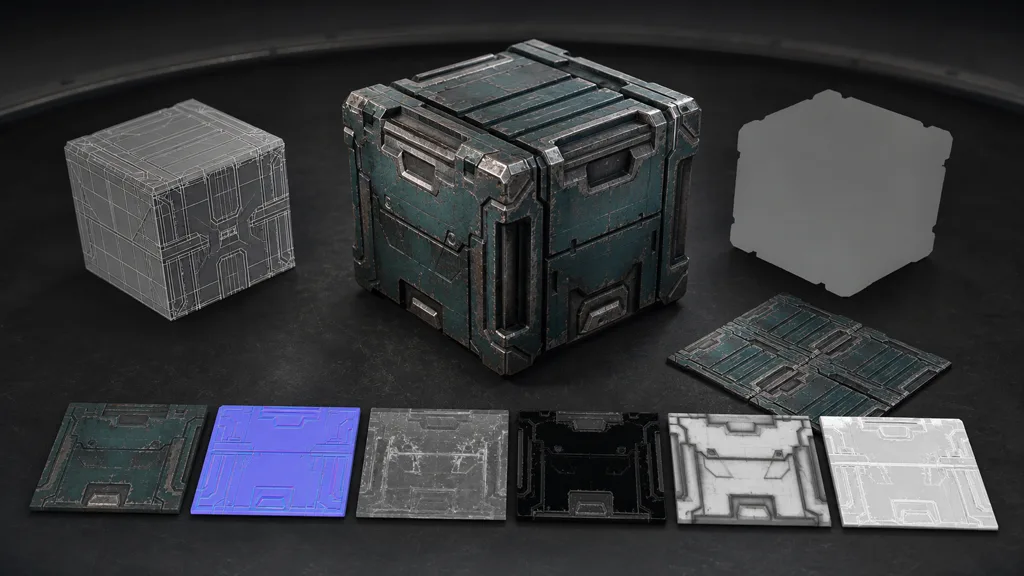
Material-focused AI 3D art tools should enter after the UV and scale decisions are stable enough to matter. AI material generation for 3D can sell the idea with a projected preview, but production requires maps that describe the same surface at matching coordinates.
For an opaque asset, verify base colour, normal, roughness, and metalness first. Height and AO are conditional. Opacity and emission should exist only when the material genuinely needs them. Keep lighting out of base colour, use metalness by exposed substance rather than brightness, and make roughness control reflection spread rather than duplicate the grayscale image.
Test texture seams at the UV boundary, padding through mip levels, texel density across parts, and wear around actual construction. A generator loves putting scratches everywhere because scratches read as “detail.” Real wear has causes: contact, handling, runoff, heat, impact, and exposed edges.
For a tileable environment surface, use the seamless texture guide. For an existing photo, use photo-to-PBR. For an editable generated set, the AI PBR material generator guide covers map coherence and engine export. AI 3D art tools work better when geometry and materials exchange scale, masks, UV intent, and naming instead of meeting for the first time inside the engine.
Apply AI to rigs and animation at the right scope
Rigging and animation are narrower jobs for AI 3D art tools: they can propose bones, map motion, solve faces, interpolate poses, or derive performance from footage. The acceptance test remains movement, not rig appearance.
Check joint centers, skin weights, twist distribution, foot contact, hand contact, root motion, loop boundaries, retarget pose, and extreme expressions. Inspect motion at the target frame rate and in the gameplay camera. A facial solve that looks persuasive in a portrait may be extravagant work for a character occupying thirty pixels.
Specialized systems often beat a general generator here. MetaHuman Animator, for instance, handles supported performance inputs within the MetaHuman framework. That does not make it the answer for a mechanical beetle, cloth simulation, or a stylized squash-and-stretch character. Choose AI tools for 3D artists by rig family and delivery format.
Never assume generated animation clears ownership or consent questions. Record performance sources, actor permissions, model terms, and allowed uses. For client work, decide whether inputs may be uploaded to a service before uploading them. Convenience is not a data policy.
Audit AI for 3D asset creation before production use
The technical output is only half the evaluation. Before adopting AI 3D art tools or broader AI for 3D asset creation, test the full handoff with one representative asset and record:
- accepted input and export formats;
- topology, UV, texture, rig, and animation editability;
- output resolution, map conventions, and coordinate system;
- commercial terms for inputs and outputs;
- retention, privacy, team access, and deletion controls;
- generation time, cleanup time, failure rate, and credit cost;
- whether the source can be rebuilt if the service changes.
Measure cleanup time, not generation time alone. A two-minute mesh followed by six hours of repair is a six-hour-two-minute mesh. It may still be worthwhile if it found the design quickly, but the spreadsheet deserves the whole number.
For studio adoption, compare a tool-assisted asset with the existing workflow using the same brief. Count accepted output, revisions, memory, defects, and downstream interruptions. The result gives AI 3D tools for indie game developers a sensible advantage: small teams can spend automation on breadth while reserving scarce art time for identity, gameplay, and final quality.
Validate production-ready AI 3D assets in the engine
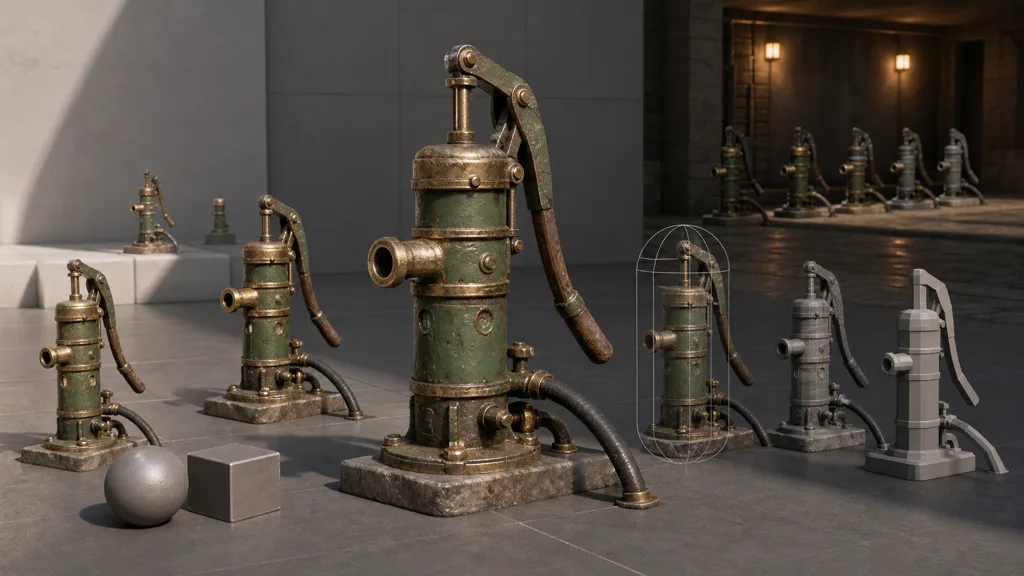
Production-ready AI 3D assets earn that description only after import. This is the final audit for AI 3D art tools: test the exact exported files, texture compression, material instances, collision, LOD transitions, lightmaps or dynamic lighting, shadows, animation, and memory on the target platform.
Use a compact validation scene:
- one close neutral-light view for normals and roughness;
- one grazing-light view for seams and shading;
- one dim view for value separation;
- near, middle, and far distances for silhouette and LOD transitions;
- repeated placement for texture and shape repetition;
- collision and interaction tests with gameplay scale references;
- a profiler capture for triangles, draw calls, texture memory, and shader cost.
Then place the asset beside its real neighbors. An isolated prop can be attractive yet too noisy, too clean, too saturated, or twice the intended scale. The final gate belongs to the scene, because the scene has no interest in how clever the generator felt.
FAQ
What are the best AI 3D art tools in 2026?
The best AI 3D art tools are the ones that solve a defined stage and return editable output your next tool can verify. Compare concept, mesh, material, rig, animation, and engine-delivery tools separately rather than expecting one service to finish every stage.
Can AI create production-ready 3D models?
AI can create useful candidates and, for simple static assets, sometimes near-final geometry. Production readiness still requires checks for silhouette, topology, UVs, normals, materials, scale, collision, LODs, licensing, and target-engine performance.
How do I use AI in a 3D art workflow?
Use AI at a named stage, freeze the approved intent, and define the next handoff before generating. Generate candidates cheaply, clean the selected asset, author coherent materials, then import and validate the exact delivery files.
Which AI tools help with 3D modeling?
Text-to-3D and image-to-3D tools help with blockouts, static prop candidates, and design exploration; remesh tools help simplify or regularize geometry. Deforming characters and close hero assets usually need deliberate retopology, UV, shading, and deformation work afterward.
Can AI generate PBR materials for 3D assets?
Yes. AI material tools can create base colour, normal, roughness, metalness, height, and AO candidates from text or images. Verify that maps align, describe plausible material properties, fit the UVs and physical scale, and import with correct colour-space and normal settings.
Are AI-generated 3D assets safe for commercial games?
That depends on the current tool terms, plan, input rights, and project requirements. Save provenance, generation date, license terms, source references, edits, and contributor permissions with every accepted asset; obtain legal advice for high-risk or unclear cases.
Will AI replace 3D artists?
AI changes where artists spend time, especially in exploration, repetitive setup, and first-pass generation. Production still needs taste, design continuity, technical art, cleanup, performance decisions, and accountability for what ships.
Try CraftPBR
CraftPBR handles the material stage inside an AI-assisted 3D art pipeline:
- Text-to-PBR creates coordinated material maps from a physical surface description.
- Photo-to-PBR converts a surface capture into aligned base colour, normal, roughness, height, AO, and metalness maps.
- Node workspace keeps masks, layers, ranges, tiling, and variations editable.
- Engine export prepares map names, normal orientation, colour/data settings, and channel packing for Unity, Unreal Engine, Blender, and Godot.
- Free tier lets you test a complete material before approving it for the asset.
- CC0 output lets you use, modify, and ship generated materials without attribution.
Let the machine make proposals. Make the pipeline keep receipts.