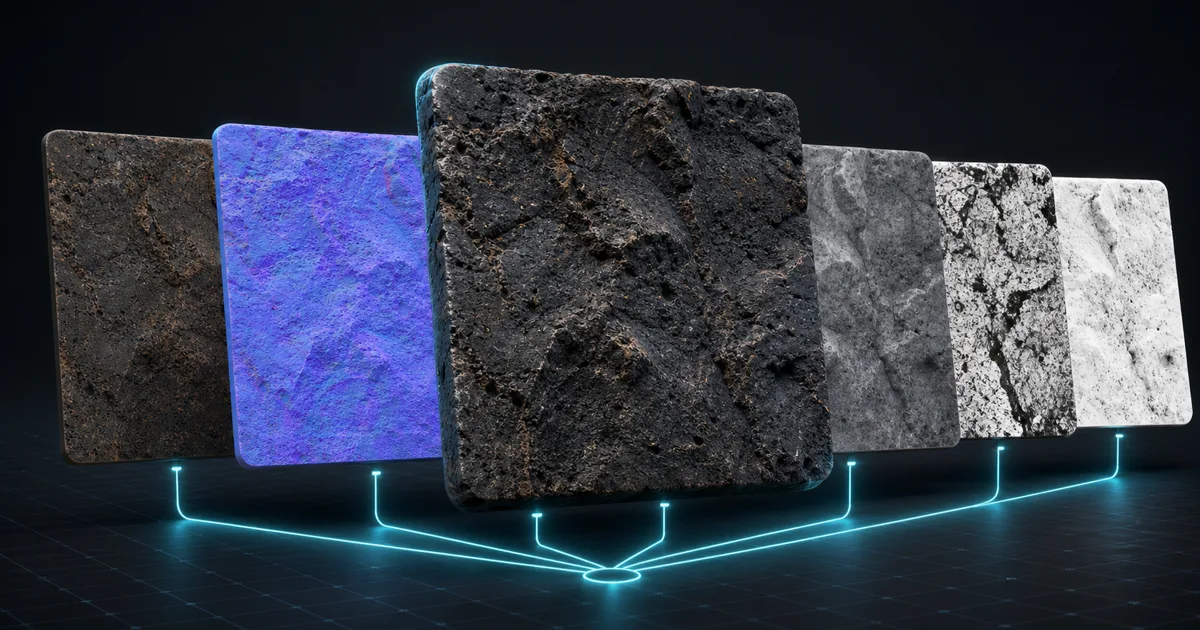
Five individually convincing texture maps can still make one terrible material. An AI PBR material generator earns its name only when albedo, normal, roughness, height, and AO describe the same surface—not five nearby ideas introduced at export. This guide shows what a complete generator should produce, how to spot a broken set, and how to move the result into a renderer without converting your shader graph into an archaeological site.
What does an AI PBR material generator actually generate?
It converts a description or photograph into the texture maps a physically based shader expects. Albedo stores base colour without baked lighting. Normal changes the apparent direction of the surface. Roughness controls reflection spread. Height describes elevation, AO darkens tight cavities, and metalness separates conductive metal from dielectric material. Our PBR workflow guide covers the underlying model; the important point here is that the maps are not decorative variants. Each answers a different lighting question about one physical surface.
A prompt such as “weathered copper sheet with patchy verdigris, shallow scratches, satin finish” contains several kinds of information. Copper and green oxidation belong in albedo. Scratches affect normal and height. The satin finish belongs in roughness. Exposed copper is metallic; corrosion is generally treated as dielectric. A good generator distributes those facts instead of painting the entire prompt into every output.
Why coherent maps matter more than a pretty preview
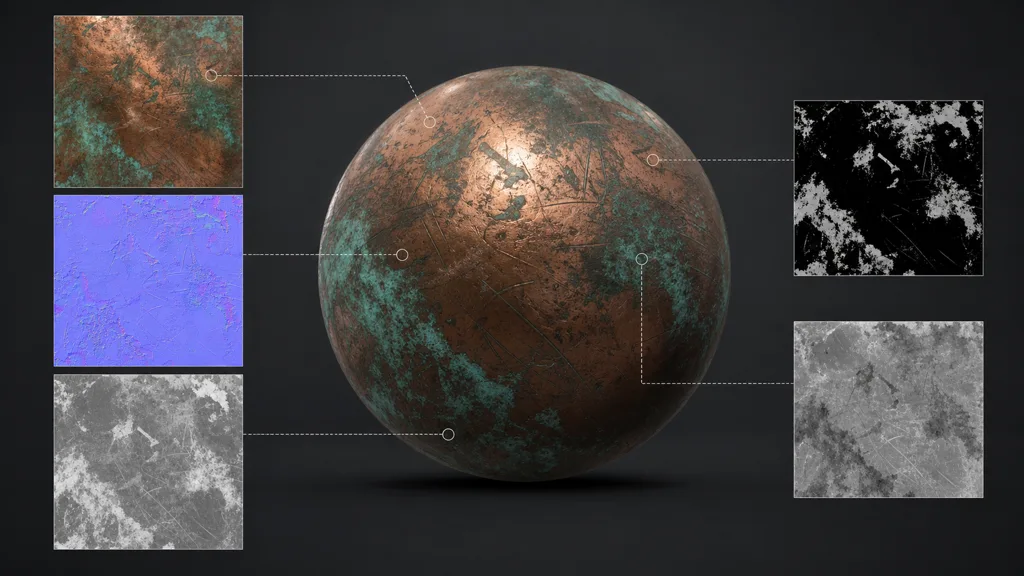
Map coherence is the hard part. If a crack appears in albedo but not normal or height, it looks printed on. If a polished patch remains bright in roughness, the reflection contradicts the colour. If green patina is marked metallic, it reflects like copper paint. These errors survive a handsome thumbnail because a fixed studio light can disguise them.
Inspect distinctive features across every output. Large boundaries should align exactly; small variation can differ when physics justifies it. Dust may raise roughness without changing height. A shallow scratch may affect normal but barely register in colour. Coherence does not mean copying one grayscale image into every slot. It means each map tells a compatible version of events.
How do you write a prompt for a usable PBR material?
Describe properties an artist could verify, in roughly this order:
- Material: limestone, anodised aluminium, glazed ceramic, packed soil.
- Scale: fine sand, 8 cm bricks, broad timber boards. Without scale, a pebble can quietly become a mountain.
- Finish: matte, oily, polished, chalky, brushed, wet.
- Age and wear: new, sun-bleached, edge-worn, oxidised, muddy.
- Structure: directional grain, scattered inclusions, shallow pores, deep joints.
- Tiling constraints: even feature distribution, no isolated landmark, no lighting or perspective.
Avoid cinematic language in the material description. “Dramatic sunset on ancient stone” asks for illumination inside albedo—the exact thing a PBR shader needs to add later. Ask for the stone, not the trailer shot. Text-to-PBR is strongest when the prompt describes matter rather than mood.
Which checks separate a production map set from a demo?
First, tile the material across a large plane. Look for seams, repeated stains, directional jumps, and one memorable feature appearing with metronomic enthusiasm. A mathematically seamless edge is not enough; the interior also needs a distribution that does not reveal the tile. Our guide to seamless tileable textures explains both problems.
Next, inspect value ranges. Albedo should contain no baked highlights or black contact shadows. Roughness should preserve variation without becoming television static. Metalness is usually near binary for clean material classes, with intermediate values reserved for transitions, dirt, or antialiasing. Normal maps should be centred around their neutral blue and free of obvious colour imagery.
Finally, confirm scale. Preview spheres make almost anything look plausible because they offer curves, highlights, and no real-world reference. Put the material on geometry with known dimensions. Mortar the width of a doorway and gravel the size of paving stones are not shader bugs, however tempting that diagnosis may be.
How should you test an AI-generated material?
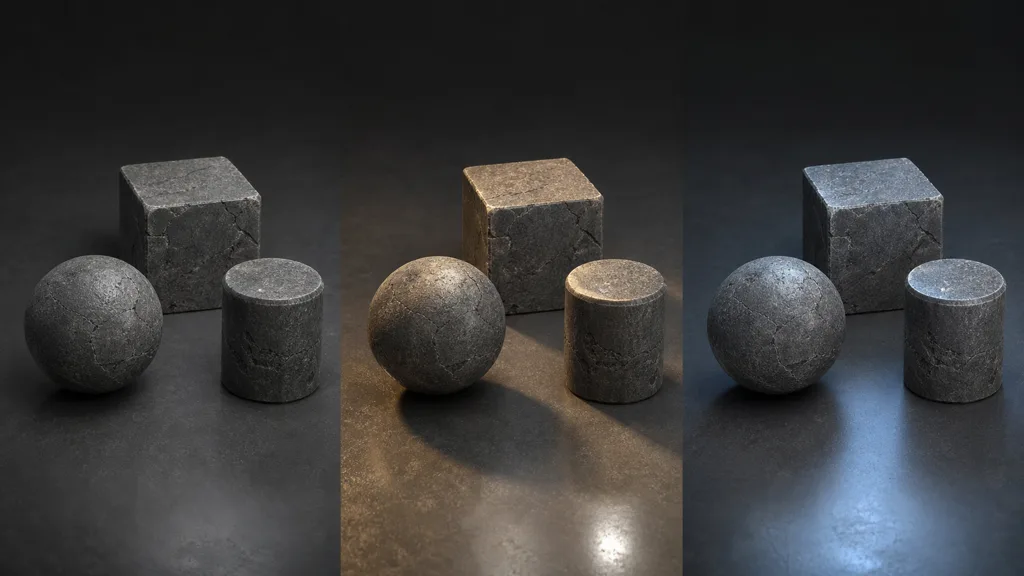
- Use simple shapes. A sphere exposes reflection response, a cube exposes scale and seams, and a cylinder catches tangent problems.
- Change the light. Test soft neutral light, a hard directional light, and a coloured environment. Baked lighting becomes obvious when the real light moves.
- Change distance. Check close detail and the normal viewing distance. Noise that looks rich at 100% can shimmer badly in motion.
- Repeat the texture. View a grid of at least four by four tiles, not a single square.
- Compare against reference. Ask whether the material behaves like the real substance, not whether it resembles the prompt thumbnail.
How do engine exports differ?
The material physics is portable; file conventions are not. Unreal commonly expects DirectX normal maps and often packs ambient occlusion, roughness, and metalness into RGB as ORM. Unity pipelines vary by shader, and some use smoothness—the inverse of roughness—packed into an alpha channel. Blender’s Principled BSDF accepts the maps directly, but normal and data maps must use Non-Color space. Godot uses an ORM texture and may need the normal Y channel flipped depending on the source convention.
Export presets should handle those mechanical differences. Still, keep an unpacked source set. A packed map is excellent for runtime and awkward for fixing only roughness. Compression also matters: colour maps want colour compression and sRGB; normals and scalar data want linear sampling and formats suited to data.
Where should AI stop and manual control begin?
AI is good at establishing a coherent base quickly. Art direction begins where specificity matters: matching an exact wall, controlling wear placement, preserving a brand colour, or tuning the response to a project’s lighting model. That is why a node workspace matters more than a regenerate button. You should be able to adjust roughness, rebalance height, repair a seam, mix materials, and export again without asking the model to roll the whole surface from scratch.
The useful division is simple: let generation solve the blank canvas; use deterministic controls to finish the asset. Randomness is productive during exploration and surprisingly unhelpful after art direction has approved the third tile from the left.
Try CraftPBR
CraftPBR keeps generation and finishing in the same workflow:
- Text-to-PBR for complete materials from a physical description
- Photo-to-PBR for turning a captured surface into coordinated maps
- Node workspace for correction, mixing, and repeatable control
- Engine export for Unity, Unreal, Blender, Godot, and Three.js
- Free tier for testing the workflow before committing anything except a prompt
- CC0 license so generated materials are yours to ship and modify
Use the PBR texture generator free →
The generator gets you to a material. The checks above decide whether it deserves a folder named final.