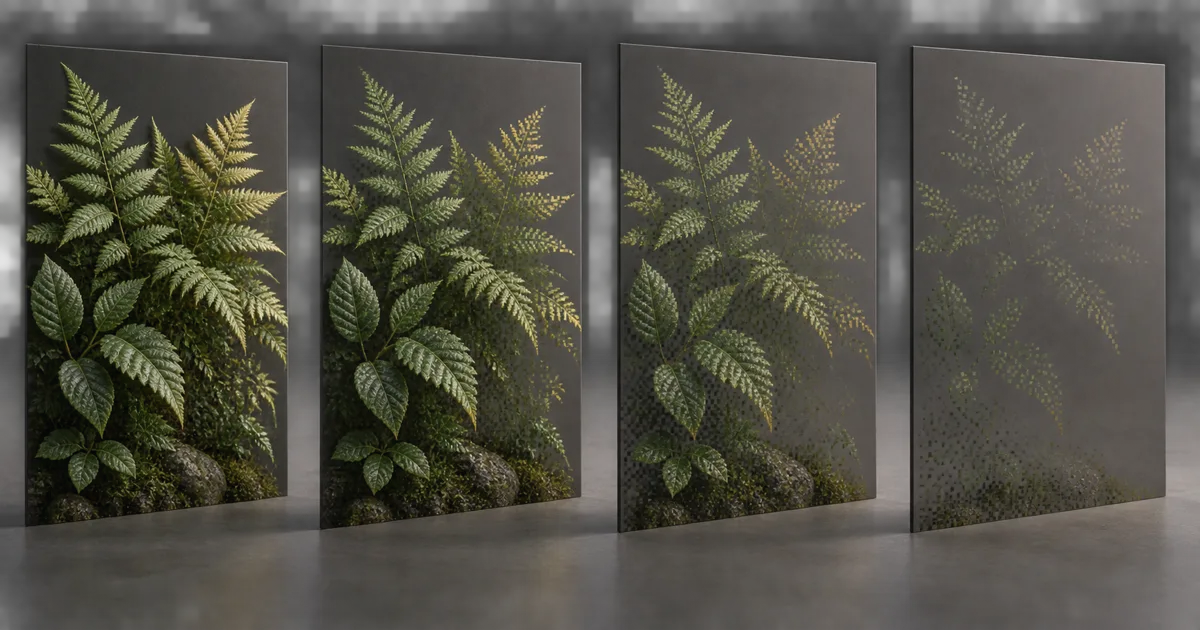
Set a surface to 50% opacity. One renderer blends every pixel at half strength. Another keeps half the samples and rejects the rest. From across the room they can look similar; inside the frame pipeline they have almost nothing in common. Dithered transparency is the second approach.
It turns continuous opacity into binary coverage distributed across pixels, samples, frames, or some combination of them. That bargain can preserve depth writes, opaque lighting, shadows, and order-independent-looking fades for foliage, hair cards, LOD transitions, and disappearing objects. The bill arrives as noise, ghosting, pattern crawl, and dependence on the anti-aliasing path. Pixels are very willing to average. They do insist on being scheduled.
Dithered transparency trades transmission for coverage
Ordinary blending combines source and destination colors. Dithered opacity usually makes a binary choice before that blend: keep this sample or discard it. If the desired opacity is 0.35, roughly 35% of the relevant samples survive. The kept samples shade as opaque; the rejected ones contribute nothing.
A minimal shader test looks like clip(opacity - threshold). The threshold comes from an ordered matrix, blue-noise texture, hash, temporal sequence, or MSAA coverage conversion. The average coverage should follow opacity without forming obvious bands, clumps, or repeated shapes. This is why alpha dithering is a sampling problem before it is an art problem.
The approximation does not reproduce colored transmission or several transparent layers accurately. A 30% green glass pane changes the light behind every pixel; a 30% dithered mask shows untouched background through 70% of samples and fully shaded green through the rest. Filtering may blend that result visually, but the physical and compositing models remain different.
Coverage patterns decide whether the fade disappears or advertises itself
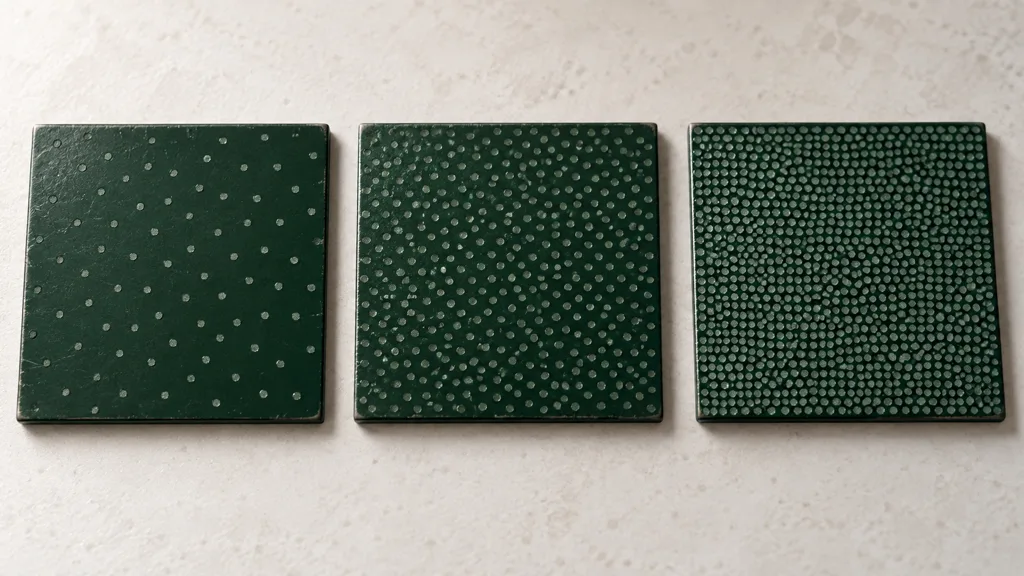
A fixed Bayer matrix is cheap, deterministic, and evenly distributed, but its grid is easy to recognize at low resolution or during slow fades. A noise texture removes the regular lattice yet may contain low-frequency clumps. A hash avoids a texture read but can correlate with screen coordinates, instance transforms, or limited precision. Alpha hash transparency is only as good as the distribution and stability of its threshold.
Keep the pattern in screen space when uniform pixel coverage matters. Object- or UV-space patterns stick to the surface, which can reduce swimming, but their projected cell size changes with distance and angle. World-space patterns can align separate objects and produce large accidental bands. There is no coordinate system in which sampling decisions become free.
Decorrelate nearby instances with a stable seed. Do not reseed from a continuously changing value unless temporal accumulation expects that sequence. Pattern animation without a consumer is just sparkle with paperwork.
Choose dithered alpha clipping, blending, or hard cutout by material
| Method | Strong fit | Main advantage | Main failure |
|---|---|---|---|
| Hard alpha clip | Dense leaves, fences, binary decals | Stable depth and crisp coverage | Harsh thresholds and distance loss |
| Dithered alpha clipping | Object fades, foliage, hair cards, LOD transitions | Opaque-style lighting and depth with graded coverage | Noise, ghosting, and AA dependence |
| Alpha blend | Smoke, glass, soft particles, colored transmission | Continuous per-pixel compositing | Sorting, overdraw, depth, and lighting limits |
| Alpha-to-coverage | Alpha-tested edges in an MSAA forward path | Subpixel sample coverage without temporal history | Quality tied to MSAA count and implementation |
Screen door transparency is a good name for what the technique really does: it places holes between visible samples. Use it when the camera or filter can integrate those holes and the material benefits from opaque pipeline features. Use real blending when the background must contribute at every sample.
For foliage silhouettes, pair this guide with alpha coverage mipmaps. Mips preserve the source cutout's coverage; dithering represents an additional runtime opacity or fade. Solving one does not guarantee the other.
Temporal dithering can look smooth until motion removes its history

Dithered transparency TAA changes or jitters the threshold sequence and lets temporal anti-aliasing accumulate multiple binary observations. A stationary surface can converge into a convincing continuous fade. Motion, disocclusion, camera cuts, particles, animation, and thin geometry reduce or reject history, exposing the raw samples again.
Good motion vectors matter, including vertex animation and world-position offset. A leaf card that moves in the base pass but reports static vectors asks the temporal filter to reuse coverage from the wrong location. Aggressive history weighting can hide noise while leaving a ghost; aggressive rejection removes the ghost while restoring noise. The slider has not betrayed you. It is displaying the trade.
Stochastic transparency should be tested at the internal render resolution, not only the final display size. Temporal upscalers may reconstruct a 4K output from a much smaller input. A two-pixel pattern at output can be less than one input pixel, which is an ambitious place to store a fern.
Dithered transparency MSAA uses sample coverage, not frame history
Dithered transparency MSAA is commonly implemented as alpha-to-coverage. Instead of discarding a whole pixel, the hardware converts alpha into a mask over its multisamples. Unity's HDRP alpha clipping documentation describes Alpha to Mask as modifying MSAA coverage in proportion to shader alpha, commonly for vegetation and other alpha-tested shaders.
With 4x MSAA, coverage has only a few directly representable levels before spatial variation adds more apparent gradation. It works best in an MSAA forward path and does not automatically become useful in a deferred or temporal configuration that lacks those samples. Confirm render-path support, sample count, shadow behavior, and platform overrides.
Alpha-to-coverage can be calmer in motion because it does not need several past frames to resolve. It can also look coarse, change character across MSAA tiers, and interact with sample masks or post-processing. TAA dithering and alpha-to-coverage solve related coverage problems with different currencies: one spends time, the other spends samples.
Set dithered transparency in Unity, Unreal Engine, and Blender
For dithered transparency Unity, a custom URP or HDRP shader can compare opacity with a stable screen-space threshold and feed the result to Alpha Clip. In HDRP forward rendering with MSAA, Alpha to Mask exposes alpha-to-coverage; verify that matching frame settings enable MSAA and Alpha To Mask. Keep the shader graph, shadow caster, depth pass, and motion-vector pass on compatible coverage logic.
For dithered transparency Unreal Engine, use a Masked material and the engine's dithered opacity path when the project uses a compatible temporal anti-aliasing method. Epic's current Material Properties documentation says Dither Opacity Mask can provide limited translucency with full lighting features when combined with Temporal Anti-Aliasing. Test TSR, TAA, FXAA, and no-AA fallbacks explicitly; a material should not assume the project setting is immortal.
For dithered transparency Blender, current EEVEE exposes a Dithered render method for grayscale hashed transparency. Blender's material settings manual notes compatibility with render passes and ray tracing, plus possible noise around transparent regions when ray tracing is active. Use Blended when colored transparency is the actual requirement.
Build a stable dithered transparency workflow in eight checks
- Classify the surface. Decide whether it needs real transmission, hard cutout, or a coverage approximation.
- Choose the averaging path. Commit to temporal accumulation, fixed spatial dithering, or MSAA alpha-to-coverage.
- Inspect the threshold. Visualize it directly and look for grids, clumps, precision bands, and repeating instance seeds.
- Apply one opacity owner. Keep texture alpha, material fade, distance fade, and LOD fade explicit before the final comparison.
- Align all passes. Check depth, shadows, motion vectors, reflections, prepasses, and ray-tracing paths.
- Attack history. Move camera and object, animate vertices, reveal backgrounds, cut cameras, and reset temporal history.
- Change resolution. Test native, dynamic resolution, upscaling, AA quality tiers, and the smallest screen footprint.
- Profile the target. Measure overdraw, early depth, shader cost, shadow cost, and image stability in the shipped build.
To fix dithered transparency noise, find which averaging path is missing before making the pattern finer. Smaller noise with no integration is still noise; it has merely become better dressed.
This is the best dithered transparency workflow 2026 because it treats anti-aliasing, coverage, passes, and motion as one contract instead of one convenient material node.
Validate dithered transparency where the pattern cannot hide
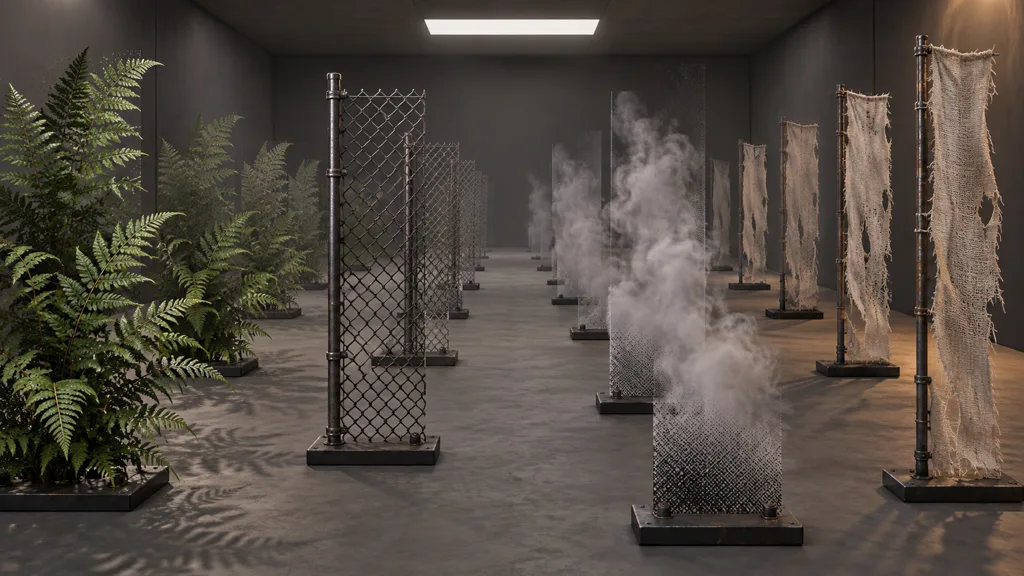
Build one lane with a dense fern, a chain-link card, layered hair-like strips, a soft smoke plane, and a fading opaque prop. Repeat each at near, middle, and far distances. Add a bright moving background so temporal trails and holes cannot borrow the room's camouflage.
Test opacity ramps slowly and quickly. Pause at 10%, 50%, and 90% coverage. Rotate the camera to grazing angles, overlap several cards, move instances independently, cast shadows, change exposure, switch AA modes, and force a history reset. Compare the result with plain clipping and blending so the chosen compromise remains visible.
Pass when average opacity is believable, the pattern does not lock into a distracting grid, motion does not trail, disocclusion settles quickly, silhouettes survive mips, shadows match intent, and performance beats the blended alternative on target hardware. Then preserve the lane. Coverage bugs migrate when the render path changes.
FAQ
What is dithered transparency?
Dithered transparency represents partial opacity with a binary pattern of fully kept and fully discarded samples. Spatial filtering, multisampling, or accumulation across frames makes the coverage look like a continuous fade while the surface can retain opaque-style depth and lighting behavior.
Is dithered transparency better than alpha blending?
It is better when stable depth writing, opaque lighting, and reduced sorting trouble matter more than perfectly smooth per-frame transmission. Alpha blending remains the better fit for glass, colored transmission, smoke, and other surfaces where each pixel must combine continuously with the background.
Why does dithered transparency look noisy?
The visible noise is the binary coverage pattern before enough spatial or temporal samples have averaged it. Large pattern cells, low render resolution, weak temporal history, disocclusion, fast motion, or an incompatible anti-aliasing path can all expose the stipple.
Does dithered transparency require TAA?
Temporal dithering usually relies on TAA or a temporal upscaler to combine changing sample decisions across frames. A fixed ordered pattern can work without TAA, and alpha-to-coverage uses MSAA samples instead, but each path has different noise, edge, and platform behavior.
What is the difference between dithering and alpha-to-coverage?
Shader dithering compares opacity with a spatial or temporal threshold and normally keeps or discards the pixel. Alpha-to-coverage converts alpha into an MSAA sample mask, so coverage resolution depends on the MSAA sample count and the render path.
Can dithered transparency cast shadows?
Yes, but the shadow pass needs a compatible coverage rule and often its own stable threshold or pattern. Reusing a rapidly changing camera-space pattern can make shadows sparkle, while a plain cutout threshold may make the shadow look denser than the visible surface.
When should I avoid dithered transparency?
Avoid it for clean colored glass, deep overlapping volumes, precise compositing, or motion where temporal history repeatedly fails. It is also a poor fit when the target uses no suitable spatial or temporal anti-aliasing and the stipple remains plainly visible.
Try CraftPBR
CraftPBR gives a dithered transparency test coherent surface maps before the runtime coverage decision:
- Text-to-PBR generates aligned base color, normal, roughness, height, AO, and metalness from a material brief.
- Photo-to-PBR converts a controlled surface photo into a coordinated PBR set.
- Node workspace keeps opacity preparation, levels, masks, tiling, and map relationships editable.
- Engine export prepares normal orientation, channel packing, color-space intent, and clear filenames.
- Free tier lets you validate one representative material through the complete render path.
- CC0 output lets you threshold, dither, repack, profile, and ship generated textures without attribution.
Choose where opacity becomes coverage. Then make every frame and pass agree.